The Importance of Keywords and Trends on Pinterest
Just like with any platform, social media or SEO on a website, keywords and trends are what will help get more eyes on your content.
Simply put, it’s what people type in the search bar when looking for ideas or something specific on Pinterest.
So I want to better explain how this can benefit you as you grow or continue growing your Pinterest account for your business. It doesn’t have to be hard or confusing. It just takes a bit of searching, and then adding it into your pins and boards. I explain all of that start to finish in How To Set Up a Business Account on Pinterest.
But for now, let’s dive in!
We’ll break down:
- What keywords are
- How best to use them on your pins
- How to use trends
- How to plan out content with keywords and trends
What Keywords Are
Again, keywords are the things people are typing into the search bar of Pinterest to start their vision search. And then the recommendations that come up at the top or as you scroll through the pins with other keyword ideas.
As a pinner looking for ideas, this is amazing! Think back to the last time you were searching on Pinterest.
I know for me, I’m currently brainstorming about starting a coffee stand with my sister. So I instantly ran to Pinterest, created a “Coffee Stand” board and started searching.
I had a vision for light green, so I searched “light green aesthetic” (big Vibe and Aesthetic girl when pinning over here!) and started finding ideas for the vibe we are going for. That led into searching “coffee stands”, then “bike coffee stands”, then “coffee aesthetic” and even “how to start a coffee stand” and “coffee recipes”.
Keywords created all of that for a fun experience, and before I knew it, 30 pins to my new board.
Some lead to blog posts breaking down how to start a coffee stand, others to recipes to try with links to the products used.
So imagine if this happens with YOUR pins.
The next step after understanding what keywords are and the benefit of them, is how to use them so your pins show up in people’s searches.
How Best to Use Keywords on Your Pins
What I recommend and will help your account grow if you do this, is adding in the specific keywords to the title, description, picture alt text (which is what the picture is saved and uploaded as) or words on the pin itself.
Think back to the last time you were looking up recipe ideas. Some of the pins had just a picture of the dish, others had the name of the recipe, and others had a list or kind of recipe like keto or warm and cozy soups.
The Pinterest algorithm is so good, that it can actually read the words on the pin itself. So having titles or descriptions on the pins as well, just adds more options for Pinterest to show your pins to the right people.
This also comes in handy when you add these keywords to your account descriptions and boards as well.
I break down board descriptions and why you should use them more in Why Pinterest Boards Are Important.
If this is getting to be a bit too much for you, don’t stress! Right now I’m currently offering Pinterest Account Set Up where I’ll take care of getting your account optimized with the best keywords and list out the trends for you. I have limited spots, so if you’re interested, you can read more about that offer.
Now remember, Pinterest can take 6-9 months to really see some traction. But unlike social media, whatever you start sharing now, won’t get lost. It will come up year after year as more people start searching for the specific pins your content talks about.
And trends can help with this.
How To Use Trends
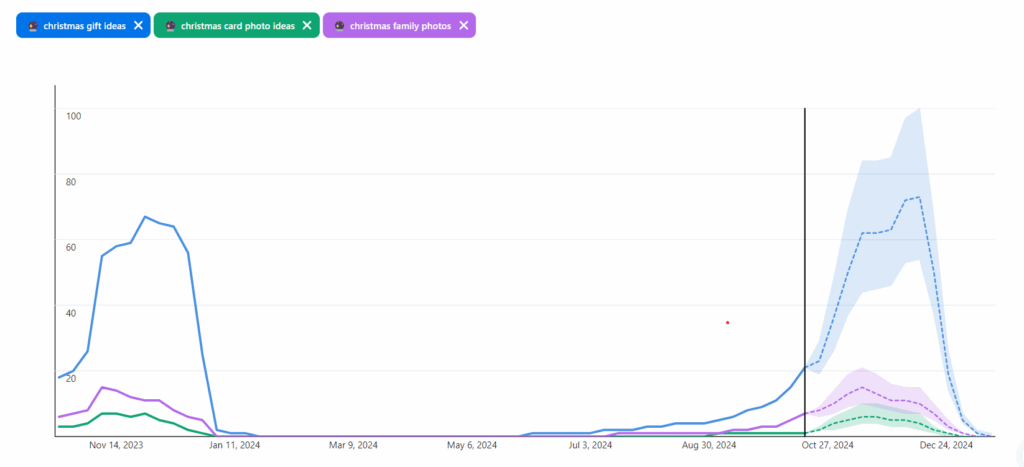
Starting out, trends are just the top searches each month, season or spike in interest for a certain topic.
How this can be beneficial for you is to get ahead of it, and also helpful in content ideas.
So let’s say, Christmas is coming up, and you have a list of Christmas gift ideas, or are a photographer that offers Christmas card sessions. People tend to start looking for ideas 30 days before purchasing, and saving on a board to come back to later. Some people it’s just a few weeks, but the benefit of trends is seeing when the spike happens, and start putting content out for it ahead of time.
That way, when the trends start going up, your pins will be out there, already have some engagement on them, and start being seen by others too.
This of course will take some trial and error just like anything else new you try. But again, your content will be around and ready to go next year if it takes a little longer.
Or if it’s not seasonal, it’ll come back when there’s another spike in interest.
How to Plan Out Content With Keywords and Trends
Now the big benefit of using both keywords and trends together, is you could plan out your entire year using them.
Going off of trends, whenever there’s going to be another big spike, start sharing content the month before and during in order to benefit from that spike. Or if you’ve written a blog about fall pictures, you can start resharing that with some new pictures to restart the engagement there.
It doesn’t always have to be new content, but what you’ve created in the past and can share again. Then using keywords in relation to the trends to get a little broader and yet more specific too.
For example, say you’re a photographer that offers Christmas card sessions. Every year, near the end of October, beginning of November, you start sharing all the Christmas card pictures from last year, that leads them to the landing page where they can sign up. You can have a mix of selling where they click through, ideas to get people to save your pins which will lead to them being shown to more people, and maybe even a blog post on How to Best Prepare for Your Family Christmas Card Session.
3 ways to get people to book a session, creating new pins for each, could lead to 10+ new pins on the same topic. I break that down even more in How to Create New Pin Images.
I know Pinterest can seem like a beast to get started and keep up with, but once you do the initial work to get it set up and prepped, it get a lot easier.
However, if you know you want to do more with Pinterest, but want support to see it through, I have a few ways I can help!
First off, I can set all of this up for you! I have an option for Pinterest Account Set Up. Spots are limited before the price goes up, so if you are curious, I’d check it out now.
And secondly, if you have your account, but the thought of spending more time creating and scheduling content is defeating rather than exciting, I do offer Pinterest Management. This is where I take over your Pinterest account for business, create and schedule pins, do the keyword and trend research to provide content ideas for you, and create a plan to increase your website traffic and sales.
Either way, I’d strongly encourage you to just start with Pinterest.
Have fun with it! It’s not like social media and has so much potential for growth.
Happy pinning!